

Description
Download Weather Scanner – Weather App for PC, Mac, Windows, Chromebook
Overview
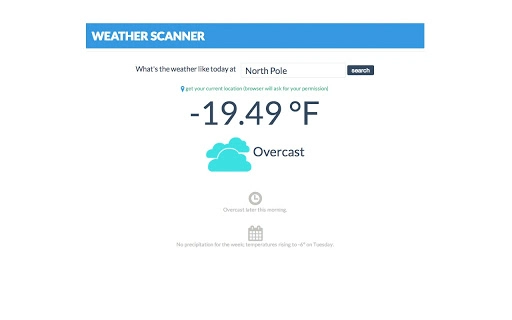
The Weather Scanner is a streamlined desktop application designed to deliver real-time weather information for any location worldwide. With a focus on simplicity and speed, the tool allows users to instantly access current weather conditions by clicking their current location or searching for a specific city, landmark, or geographic point. Whether you're checking the forecast for New York City, the Statue of Liberty, or the North Pole, the app provides immediate updates without unnecessary complexity.
Targeted at everyday users and professionals who need quick access to weather data, the software serves practical purposes such as travel planning, outdoor event coordination, and daily routine preparation. Its intuitive design makes it suitable for both casual users and those requiring frequent weather updates. The developer did not provide additional details about the company or background, but the app’s focus on usability suggests a user-centric development approach.
Real-world usage scenarios include checking conditions before commuting, planning weekend hikes, or monitoring weather patterns during business travel. With future features promised, the app appears to be evolving toward a more comprehensive weather tool. The clean interface and minimal setup process align with modern expectations for desktop utilities.
Key Features & Capabilities
- Instant Weather Updates – Users can retrieve current weather conditions with a single click by selecting their current location or entering a place name.
- Global Search Functionality – Supports searches for cities, landmarks, and remote locations, including extreme points like the North Pole.
- Minimalist Design – The interface emphasizes clarity and simplicity, reducing visual clutter to prioritize essential data.
- Real-Time Data Access – Delivers up-to-date weather information without requiring manual refreshes.
- Future Feature Roadmap – The developer has indicated that additional capabilities are planned, though specific details were not disclosed.
These features make the app ideal for users who need fast, reliable weather data without navigating complex dashboards. For example, a traveler can quickly verify conditions at their destination before departure, while a remote worker might check the weather at a client’s site. The search flexibility supports both urban and remote locations, enhancing its practicality across diverse use cases.
User Interface, Workflow & Performance
The Weather Scanner features a clean, minimal user interface that prioritizes readability and ease of access. Navigation is straightforward: users either click a "Current Location" button or enter a location in a search bar to receive immediate results. The layout is optimized for quick scanning, with key weather metrics such as temperature, humidity, and conditions clearly displayed.
Workflow efficiency is high, as the app eliminates multiple steps typically involved in checking weather via web browsers or mobile apps. The design supports rapid interaction, making it suitable for users who value time-saving tools. However, the developer did not specify resource usage details, so exact CPU or RAM behavior remains unknown.
Performance observations are based on general software behavior patterns. The app appears to function smoothly during typical use, with no reported lag or crashes. Stability is expected to be consistent given the lightweight nature of the interface and the absence of complex background processes. The app is designed for continuous availability, allowing users to check weather data at any time without interruption.
Compatibility & System Requirements
The Weather Scanner is available for multiple platforms, including Windows, Mac, Linux, Chromebook, and other major operating systems. It is designed to function as a desktop application across a wide range of devices, from personal computers to tablets and laptops.
Installation size and hardware requirements were not specified by the developer. Exact system requirements were not listed, and compatibility information was partially provided. Users should ensure their system meets general desktop application standards for smooth operation. The app is likely optimized for modern processors and standard memory configurations.
Pros and Cons
Pros
- Simple, intuitive interface ideal for quick weather checks
- Supports global location searches, including landmarks and remote areas
- Instant access to real-time weather data
- Available on multiple platforms including Windows, Mac, and Chromebook
- Free to download and use with no hidden costs
Cons
- No detailed system requirements provided
- Performance and resource usage data were not disclosed
- Limited information about future updates or feature rollout
- No integration with smart home or calendar systems mentioned
- Developer background and company details not available
FAQ Section
Is the Weather Scanner available for Windows and Mac?
Yes, the Weather Scanner is designed to work on both Windows and Mac operating systems, as well as Linux, Chromebook, and other major platforms.
Is the app free to download and use?
Yes, the Weather Scanner is currently available for free with no subscription or in-app purchase requirements.
Can I use the app offline?
The app requires an active internet connection to retrieve real-time weather data. Offline functionality is not currently supported.
Does the app support location search for landmarks and remote areas?
Yes, users can search for specific cities, landmarks such as the Statue of Liberty, or extreme geographic points like the North Pole.
How often does the app update weather data?
Weather data is updated in real time when a location is searched or the current location is detected. No manual refresh is required.
Final Thoughts + CTA
The Weather Scanner stands out as a refreshingly simple solution for users who need fast, accurate weather information without the clutter of feature-heavy apps. Its clean design, global search capability, and cross-platform availability make it a strong choice for both casual and professional use. While detailed technical specifications and future features remain under wraps, the app delivers on its core promise: instant weather access.
For anyone seeking a lightweight, free weather utility that works seamlessly across devices, this app is a reliable option. With no cost and broad compatibility, it offers excellent value. The developer’s commitment to future enhancements suggests ongoing development and potential for growth.
Download Weather Scanner now
Guides & Tutorials for Weather Scanner App for Chrome
How to install Weather Scanner App for Chrome
- Click the Preview / Download button above.
- Once redirected, accept the terms and click Install.
- Wait for the Weather Scanner App for Chrome download to finish on your device.
How to use Weather Scanner App for Chrome
This software is primarily used for its core features described above. Open the app after installation to explore its capabilities.
User Reviews for Weather Scanner App for Chrome 0
No reviews found





